macOS Tahoe 26.3.1 update will "upgrade" your M5's CPU to new "super" cores

March 6, 2026
macOS Tahoe 26.3.1 update will "upgrade" your M5's CPU to new "super" cores

Here's something that caught my attention — Apple just renamed its high-performance CPU cores to 'super' cores with the macOS Tahoe 26.3.1 update. So, if you’ve got an M5 MacBook Pro, the system now labels your 'performance' cores as 'super' cores — no performance boost, just a name change, according to Andrew Cunningham at Ars Technica. Now, here's where it gets interesting — Apple’s rebranding seems to be more about marketing than tech. The update updates the labels in System Info and Activity Monitor, making it clear that these cores are now 'super.' But remember, this only applies to the old M5 MacBook Pro — newer Macs with M5 chips will already have these names out of the box. So, what does this actually mean for you? Mostly, it’s a branding move, not a performance tweak. Still, it’s a sign Apple’s pushing hard on this 'super' core idea, and we’ll see if it influences future chips or just keeps things fresh in marketing.

As part of Apple's flurry of Mac announcements earlier this week, the company announced the new M5 Pro and M5 Max processors. And those chips are shaking up the way that Apple designs and talks about its processor cores: What would have been called "performance" CPU cores are now "super" cores. "Efficiency" cores are still called efficiency cores. And there's a new, third type of CPU core in between that is labeled a "performance" core.

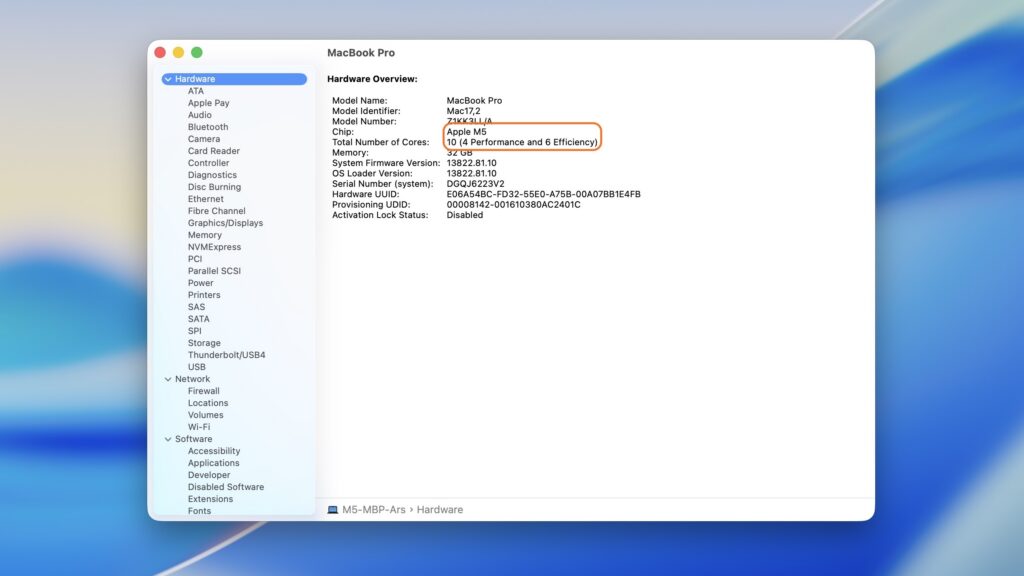
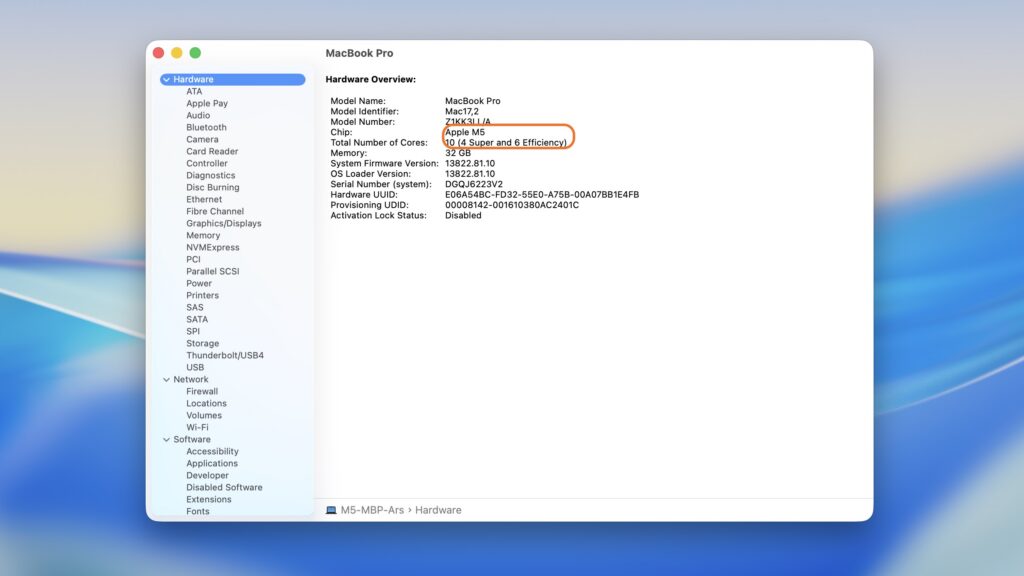
Apple said earlier this week that the "super" name change would retroactively apply to the regular-old Apple M5's performance cores, too. And the macOS Tahoe 26.3.1 update released yesterday officially made the name change, changing the labeling in both the System Information app and the Activity Monitor.
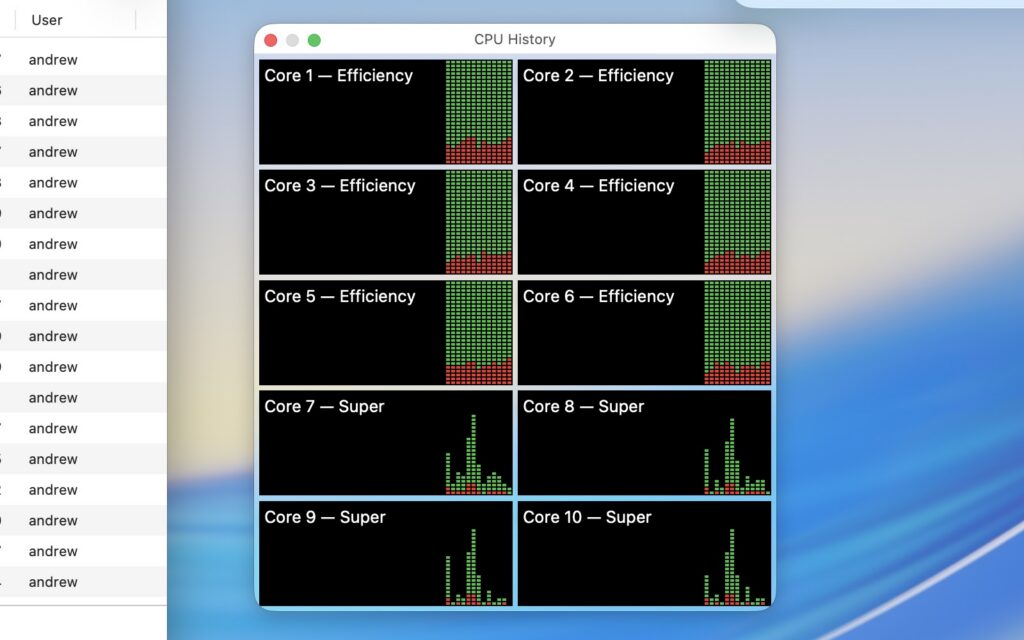
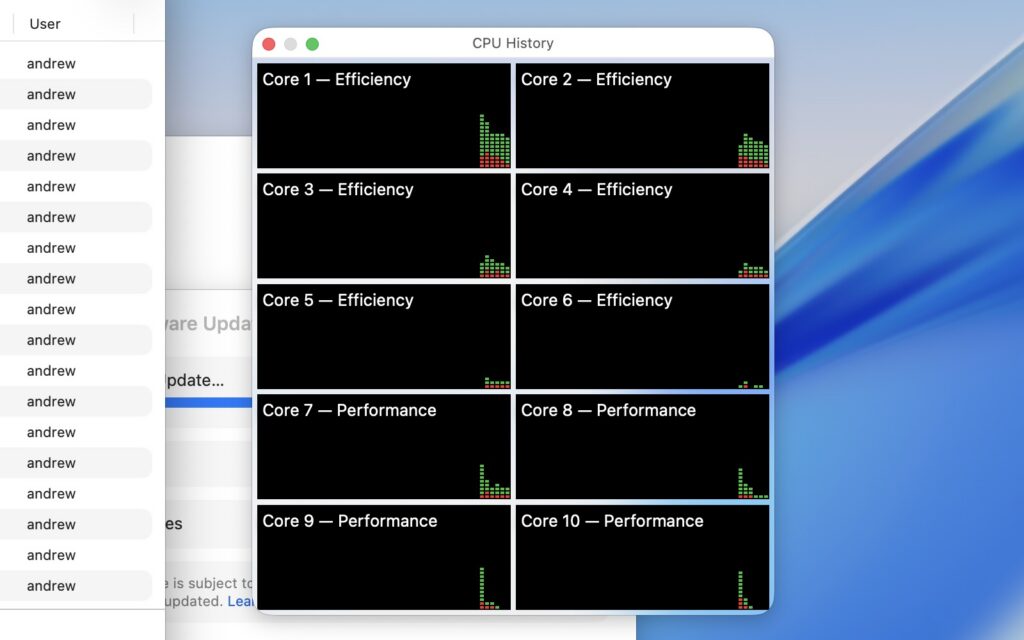
The Activity Monitor in macOS 26.3.1 updates your "performance" cores to "super" cores. Credit: Andrew Cunningham
Activity Monitor on the M5 MacBook Pro in macOS 26.3, before the name change was announced. Credit: Andrew Cunningham
The System Information app also now refers to M5's high-performance cores as "super." Credit: Andrew Cunningham
System Information in macOS 26.3, when the big cores were still called "performance" cores. Credit: Andrew Cunningham

This "upgrade" should only apply to the M5 MacBook Pro, the sole M5-family Mac released before the name change was announced. It should go without saying that this is just a name change; you shouldn't actually expect different behavior or performance from your Mac after installing the update. The new MacBook Airs and Pros with M5, M5 Pro, and M5 Max chips will likely already be using the new names out of the box.

Read full article

Comments

Audio Transcript

As part of Apple's flurry of Mac announcements earlier this week, the company announced the new M5 Pro and M5 Max processors. And those chips are shaking up the way that Apple designs and talks about its processor cores: What would have been called "performance" CPU cores are now "super" cores. "Efficiency" cores are still called efficiency cores. And there's a new, third type of CPU core in between that is labeled a "performance" core.

Apple said earlier this week that the "super" name change would retroactively apply to the regular-old Apple M5's performance cores, too. And the macOS Tahoe 26.3.1 update released yesterday officially made the name change, changing the labeling in both the System Information app and the Activity Monitor.
The Activity Monitor in macOS 26.3.1 updates your "performance" cores to "super" cores. Credit: Andrew Cunningham
Activity Monitor on the M5 MacBook Pro in macOS 26.3, before the name change was announced. Credit: Andrew Cunningham
The System Information app also now refers to M5's high-performance cores as "super." Credit: Andrew Cunningham
System Information in macOS 26.3, when the big cores were still called "performance" cores. Credit: Andrew Cunningham

This "upgrade" should only apply to the M5 MacBook Pro, the sole M5-family Mac released before the name change was announced. It should go without saying that this is just a name change; you shouldn't actually expect different behavior or performance from your Mac after installing the update. The new MacBook Airs and Pros with M5, M5 Pro, and M5 Max chips will likely already be using the new names out of the box.

Read full article

Comments

0:00/0:00